
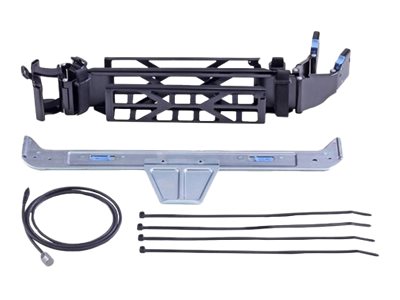
Dell 2U Cable Management Arm for PowerEdge R540
Original price was: R999,00.R929,00Current price is: R929,00.
The Dell R540 cable arm is a model-specific rear cable management accessory for the PowerEdge R540 2U server. It mounts to the R540 rail kit and retains all rear cables during slide-out maintenance, eliminating cable disconnection and connector stress.
- Designed specifically for Dell PowerEdge R540
- Articulating arm extends with server during slide-out
- Compatible with Dell ReadyRails sliding rail kit
- Organises power, network and management cables
- Tool-free clip-based cable routing
Availability: 1 in stock
Dell R540 Cable Arm — Rear Cable Management for the PowerEdge R540
The Dell R540 cable arm is the model-specific cable management accessory engineered for the PowerEdge R540, Dell’s 2U dual-socket rack server. It is dimensioned to match the R540’s chassis width, rail attachment points and rear cable exit positions. This provides a correct fit that universal cable management arms cannot replicate. A properly fitted Dell R540 cable arm eliminates rattling, misalignment and cable routing compromises that result from using non-specific alternatives.
In rack deployments where an R540 operates as a primary compute or storage node, the rear cable count can be substantial. Multiple power cords, Ethernet from two or more NIC ports, the iDRAC management port cable and potentially external SAS connections for attached drive shelves all terminate at the rear. Without the Dell R540 cable arm, this bundle must be fully disconnected before any slide-out maintenance can occur.
Articulation During Maintenance
The key capability of the Dell R540 cable arm is its controlled articulation during slide-out. As the R540 moves forward on its ReadyRails, the arm extends and pivots outward. All attached cables travel with the arm under consistent tension. No connector is pulled at an angle or stressed during the slide-out movement. When the server returns to rack position, the arm retracts neatly behind the chassis. A single technician can perform the full procedure unassisted.
Installation and Cable Routing
The Dell R540 cable arm attaches tool-free to the rear of the ReadyRails sliding kit. Clip-based retention guides along the arm length accept cables of different diameters individually. Routing cables through separate clips maintains order and makes individual cable identification straightforward during future upgrades or fault-finding exercises.
Browse all Dell server rack accessories at Briggi Tech or verify R540 compatibility at Dell.
Only logged in customers who have purchased this product may leave a review.
Related products
-
Sale!
 Server Accessories
Dell BOSS-S2 Controller Card Low Profile
Original price was: R2249,00.R2099,00Current price is: R2099,00. Add to basket -
Sale!
 Server Accessories
Dell BOSS-S2 Cable Kit for PowerEdge R750xs
Original price was: R1749,00.R1639,00Current price is: R1639,00. Add to basket -
Sale!Server Accessories
Dell Intel Ethernet I350 Quad-Port 1GbE Network Card
Original price was: R12779,00.R11939,00Current price is: R11939,00. Add to basket -
Sale!Server Accessories
Dell PowerEdge T150 Tower Server with 4x 3.5″ Bays
Original price was: R34409,00.R32159,00Current price is: R32159,00. Add to basket




Reviews
There are no reviews yet.